 Trackademia
From a department directory
to a comparison.
Start with the people in a department. Record the evidence. Compare within a defined context.
Research, then check.
Establish who is in the department
AI research agents read each department’s own official directory. Trackademia starts with department membership rather than inferring faculty from publication databases.
Find the public evidence
Sources include official department directories, public scholarly citation profiles, CVs and published honors lists.
Check and preserve the source
Code checks every answer. Every fact keeps the source it came from. A check does not make the record infallible; missing information stays marked as missing.
What a record contains.
The public-source database records these details for academics in a department. Access to the product requires sign-in.
- Appointment
- Appointment, rank and tenure status.
- Citation figures
- Recorded from public scholarly citation profiles.
- PhD
- Doctoral education information.
- Major honors
- Honors from a fixed list.
- CV
- A link to the academic’s CV.
- Publications
- Publications and the journal each appeared in.
Compare like with like.
Analytics uses fixed comparisons, with one definition per figure. People are compared within their own field and career stage.
Academics can see where they sit in their department and in their field at their career stage. Chairs can compare their department with the same department elsewhere.
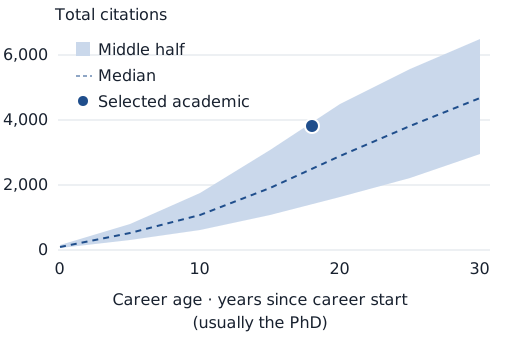
The career curve illustrates why context matters: the comparison changes with career age. Its band shows the middle half, not a target everyone should meet.
Understand the limits of citation figuresThe career curve
Fictional field: comparative systems
Five views of the evidence.
Choose the scope of the question. Keep each discipline in its own context.
- Dean
- Tick the departments you oversee and see each against the same discipline at the other universities. Departments are never added together.
- University
- See each discipline’s rank among the universities covered, with a count of ranks.
- Field
- See a league table of every department in a discipline.
- Compare
- Put two academics, two departments in the same discipline, or two universities side by side.
- Coverage
- See how complete the data is, by department, university and discipline.
What comes next.
Linking institutional CV records to the public data; Example University, a fictional demo institution; and a way for academics to see their own record and request corrections.
Start with your institution’s questions.
Access is private. Every account is approved individually.